Ticket Items Report
Overview
The Ticket Item Report is a feature in RepairDesk that allows users to view the total number of parts being used while repairing a device. This report provides valuable insights into the parts associated with specific tickets and the cumulative quantity of parts used in all repairs.
1. Key Features of the Report
- View All Parts Used: Users can easily view all the parts that are being used during the repair process.
- Parts Associated with Tickets: The report enables users to see which parts are associated with specific tickets, providing a clear overview of the repair history.
- Cumulative Quantity: Users can keep track of the cumulative quantity of parts being used across all repairs.
2. Search Filters
The Ticket Item Report offers various search filters to refine and customize the report based on specific requirements. These filters help users find the desired information quickly and efficiently. The available search filters include:
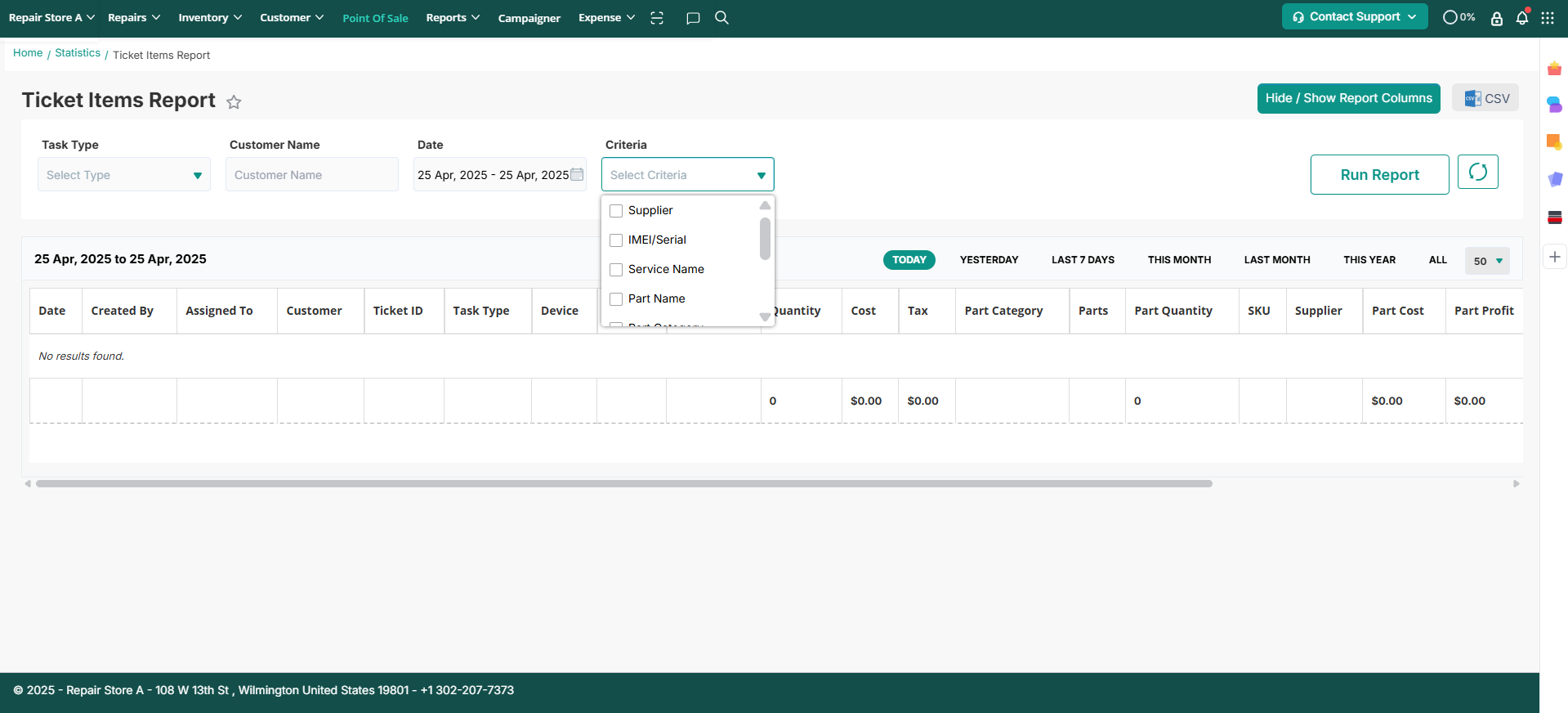
- Task Type: Filter the report based on task types used in managed tickets.
- Date: Users can specify a date range to filter the report.
- Customer Name: Search for tickets based on the customer's name.
- Part Name: Search for tickets containing specific parts.
- Service Name: Find tickets based on the service name.
- SKU: Filter the report based on the part SKU.
- Device Serial / IMEI: Search for tickets using the device's serial number or IMEI.
- Supplier: Filter the report based on the supplier of the parts.
3. Report Columns
The Ticket Item Report presents the following columns to provide comprehensive information about each ticket and its associated parts:

- Date: Displays the date on which the ticket was completed or a specific date set by the user.
- Customer Name: Shows the name of the customer for whom the ticket was created.
- Ticket ID: Displays the unique identification number assigned to each ticket. Clicking on the ticket ID will lead to the ticket details.
- Task Type: Shows the type of task associated with the ticket.
- Device: Displays the name of the device being repaired.
- Service Name: Shows the name of the service provided for the repair.
- Service IMEI/Serial: Displays the IMEI or serial number of the device for which the service is performed.
- Quantity: Shows the quantity of the service.
- Cost: Displays the price of the service.
- Tax: Shows the tax applied to the service price.
- Parts: Displays the parts used in the repair.
- Part Quantity: Shows the quantity of each part used during the repair.
- SKU: Displays the SKU attached to each part used.
- Supplier: Shows the supplier associated with each part used.
- Part Cost: Displays the cost of each part.
- Total Part Consumed: Shows the total number of parts consumed.
- Part Name: Displays the name of the part used on the ticket.
- Part SKU: Shows the SKU of the part used.
- Part Used: Displays the total number of parts used.
4. Hide/Show Report Columns
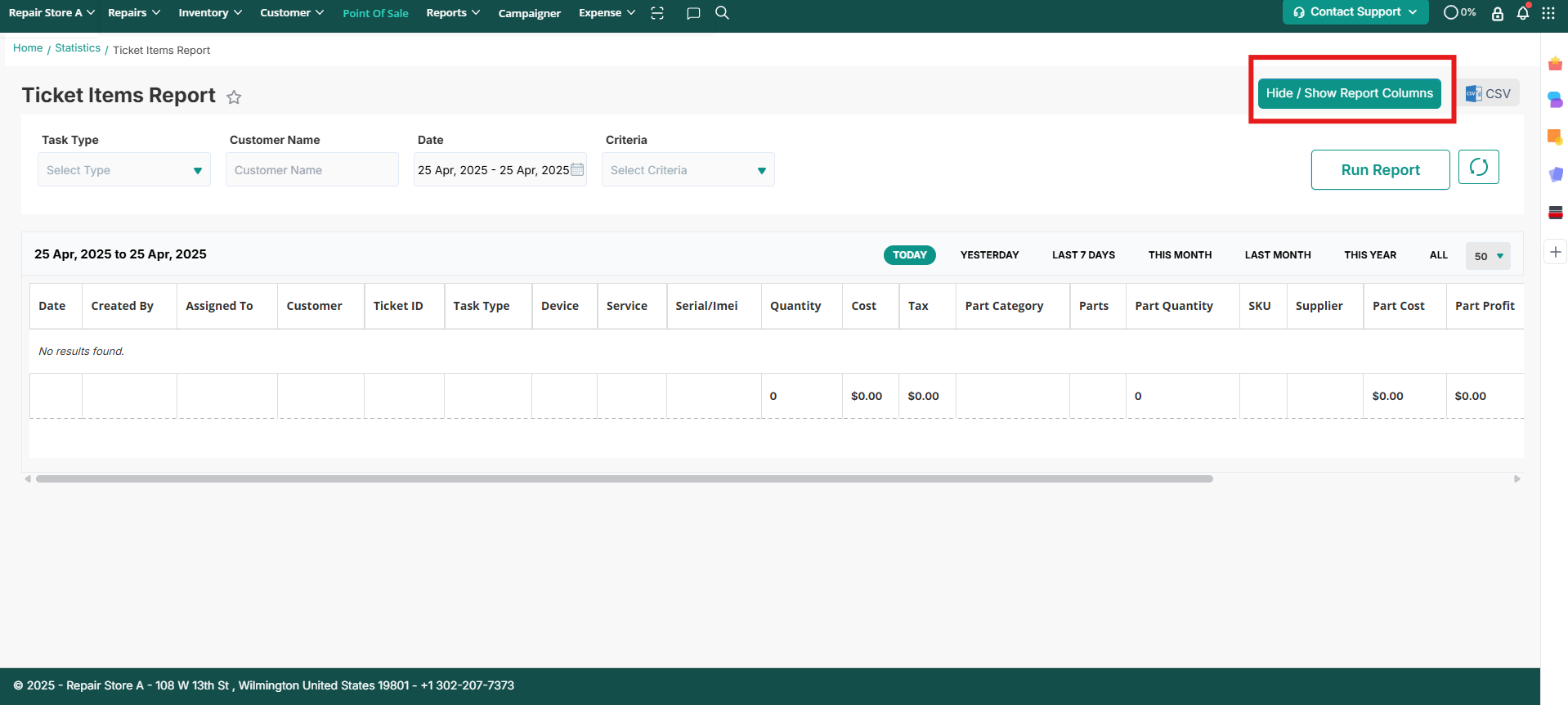
RepairDesk offers a functionality that allows users to customize the report columns according to their preferences. By using this feature, users can hide or show specific report columns based on their requirements. If the report is exported, it will only export the columns that are currently shown in the report. For example, if a user does not want to include tax information in the report, they can simply hide the respective column.
Note: To hide/show report columns, refer to the following image:
By utilizing the Ticket Item Report in RepairDesk, users can efficiently track and manage the parts used in the repair process. This feature provides valuable insights and helps streamline the repair workflow, enabling users to deliver exceptional customer service.
Contact Support
If you have any questions or require further assistance, please visit our website at www.repairdesk.co or email us at support@repairdesk.co. Our support team is ready to help you with any queries or concerns you may have.
FAQs
How can I generate snapshots for Ticket Items Report?
You can schedule Ticket Items Report Snapshots to save a historical copy of your report at regular intervals.
Go to Store Settings > Inventory > Inventory Configuration > Advance > Ticket Items Report Snapshot
You can choose to receive snapshots via email, through the Export Log Report, or both.
The snapshot remains unchanged after it is created, even if tickets are closed later, parts are consumed, or other ticket-related changes occur, ensuring you always have an accurate historical record.