In Transit Inventory Report
Overview
The In Transit Inventory report provides valuable data on inventory items that are currently in transit, meaning the transfer process has not yet been completed or the items have been marked as faulty. This report offers insights into the progress and status of inventory transfers between different locations.
1. Search Filters
The In Transit Inventory report provides several search filters to help you find specific information:
- To Location: Filter the in-transit inventory items based on their destination location.
- Date: Filter results based on the date when parts were consumed for a specific service.
- Criteria: Select the criteria for your product.
2. Report Columns
The In Transit Inventory report includes the following columns:
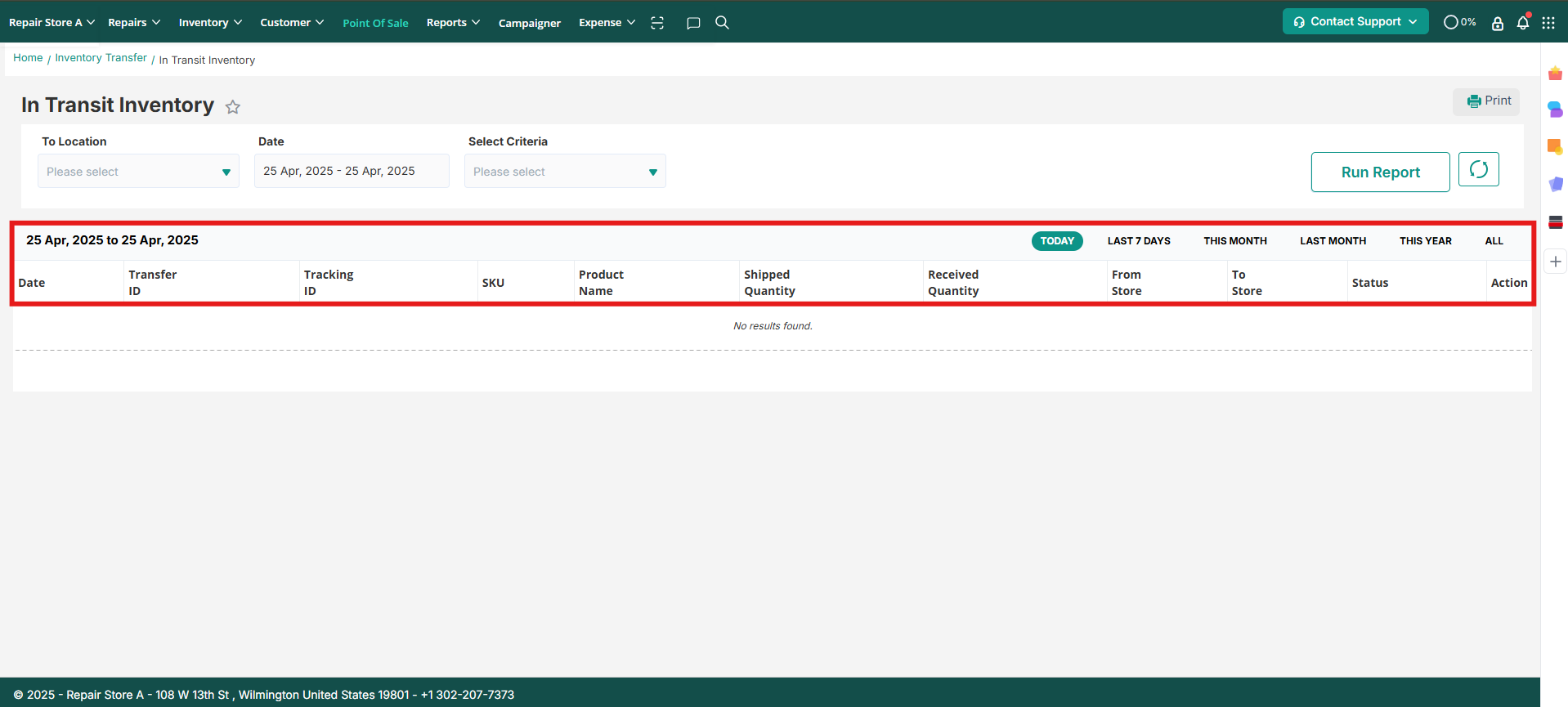
- Date: This column displays the date of the specific inventory transfer.
- Transfer ID: The unique ID of the in-transit order is shown in this column.
- Tracking ID: If a Tracking ID was specified, it will be displayed in this column.
- SKU: The SKU for each item is shown in this column.
- Name: The name of the in-transit inventory item is displayed here.
- Shipped QTY: The total quantity of the item in transit is depicted through this column.
- Received QTY: For partially received items, the total quantity in transit is shown in this column.
- From Location: The store from which the inventory was transferred is displayed in this column.
- To Location: The destination store/location of the in-transit inventory item is shown here.
- Status: This column displays the status of the specific transfer item.
- Action: This option is available for rejected and faulty items. Users can choose to either add the inventory back to the system or mark it as faulty.
Key Takeaway
In Transit Inventory reporthelps users understand how to access the report, utilize various search filters, and interpret the data presented in the report columns. Use this article to find guidance and solutions related to managing inventory items that are in transit.
Contact Support
If you have any questions or require further assistance, please visit our website at www.repairdesk.co or email us at support@repairdesk.co. Our support team is ready to help you with any queries or concerns you may have.
FAQs
How can I generate snapshots for In Transit Report?
You can schedule In Transit Report Snapshots to capture the report at regular Intervals.
Go to Store Settings > Inventory > Inventory Configuration > Advance > In Transit Inventort Snapshot
During setup, you can choose to receive snapshots via email, through the Export Log Report, or both.
Once generated, the snapshot preserves the report exactly as it was at that moment, even if transfer orders are received or inventory changes later.