How to add diagnostic notes to tickets and invoices?
Diagnostic notes is an additional information about repair ticket. They are public notes and can be seen by technicians as well as customers. They are mentioned in invoice as well. You can add diagnostic note from POS while creating a repair ticket, or add them in an existing ticket.
Steps:
A. From POS
1. Proceed to create a ticket and on the Details page, enter Diagnostic Notes in its relevant text field.
2. Click on Confirm. Now when you will create a ticket, these notes will appear in ticket as well as invoice.

B. From Ticket Details
1.Go to Repairs >> Manage Tickets.
2. Open a ticket by selecting Action >> View Ticket.
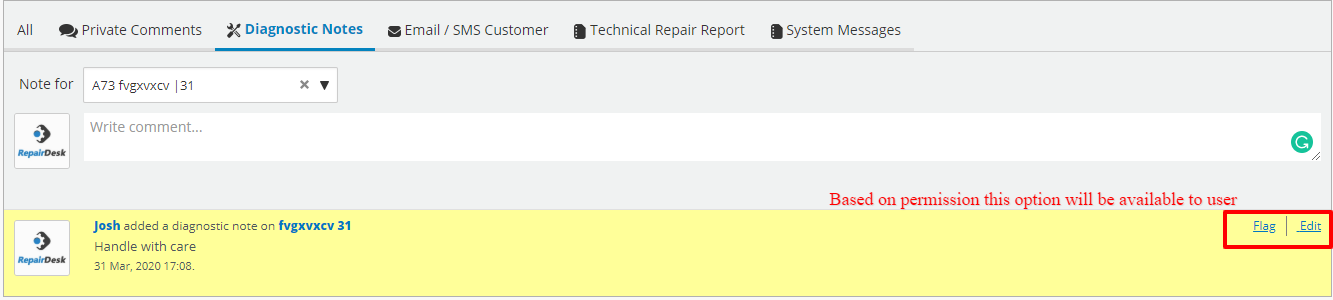
3. At the bottom, under the Diagnostic Notes tab you can view all the public diagnostic comments.
4. If you want to add another one, simply write one in the text field and click on Save.

These diagnostic notes will also appear in the description section on the invoice.


Steps:
A. From POS
1. Proceed to create a ticket and on the Details page, enter Diagnostic Notes in its relevant text field.
2. Click on Confirm. Now when you will create a ticket, these notes will appear in ticket as well as invoice.
B. From Ticket Details
1.Go to Repairs >> Manage Tickets.
2. Open a ticket by selecting Action >> View Ticket.
3. At the bottom, under the Diagnostic Notes tab you can view all the public diagnostic comments.
4. If you want to add another one, simply write one in the text field and click on Save.
These diagnostic notes will also appear in the description section on the invoice.
FAQ:
Q.is there any way to edit the already added diagnostic note?
A. Yes, you can edit the already added diagnostic note, you just need to allow the specific role to edit the notes.
A. Yes, you can edit the already added diagnostic note, you just need to allow the specific role to edit the notes.
Based on that you can have the option to edit the notes: