How can I send Invoice via email?
RepairDesk allows you to send invoices via email to your customers or anyone else in a couple of clicks.
To send invoice via email:
1. Head to Manage Invoices section
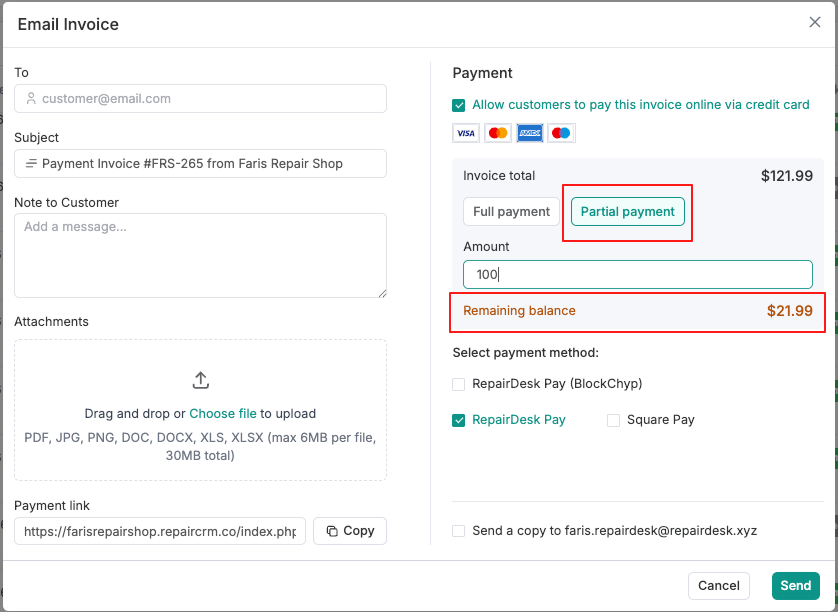
2. From the list of invoices, click on three dots Action button against an invoice and select Send Invoice > Email Invoice from the drop-down menu.
3. You can also open an individual invoice and click on Action button. Click on Email Invoice from the drop-down menu.
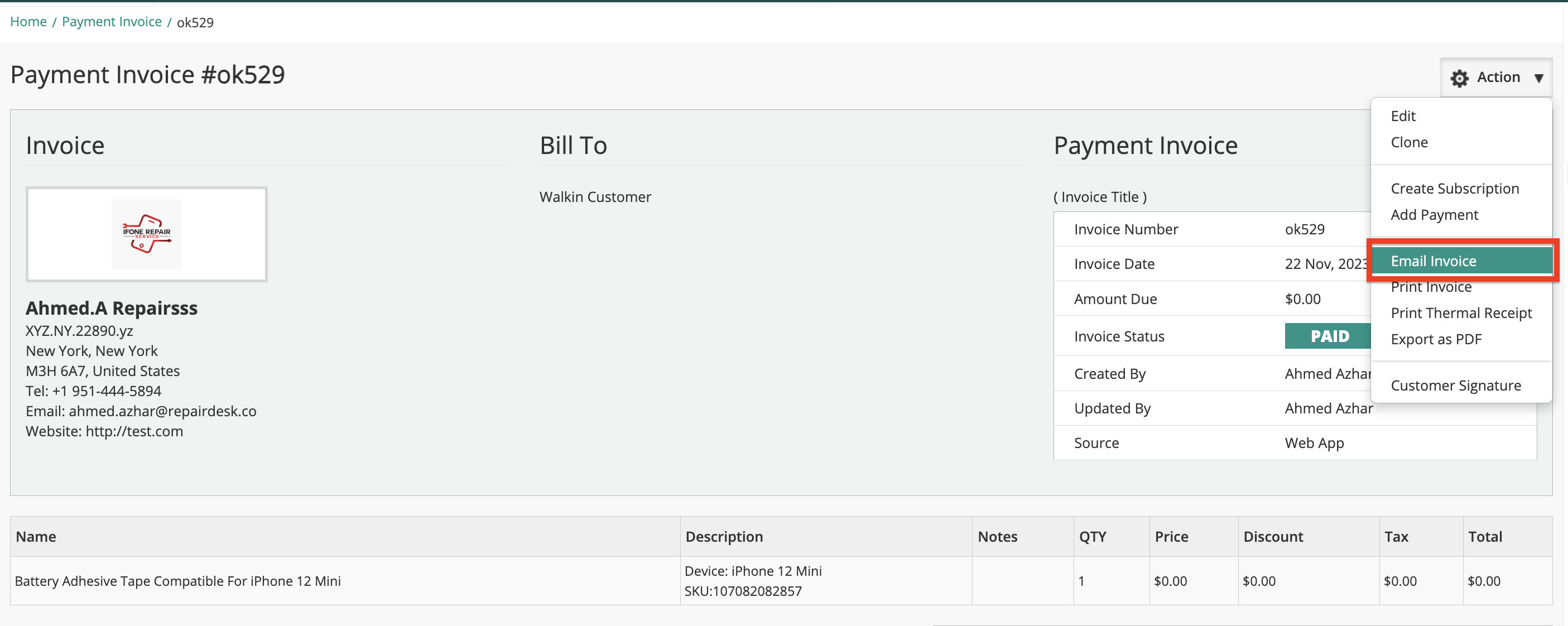
4. A pop up screen will open. From here you can enter following information:
To - Email address of the customer/ recipient.
Notes - Additional notes you wish to add to your email.
Subject - Subject line of email.
Send a copy to - A trigger which when enabled, will send a copy of the invoice to your email address as well.
Payment - Allow customers to pay this invoice online via credit card
Invoice Total - Allow customers to pay the Full payment amount or Partial Payment
Select Payment Method - Choose one of your integrated payment methods.
Once done, click on Send button to email invoices to recipients.
FAQs
Can I attach additional files when sending an email invoice?
Yes, you can now attach files — such as customer purchase orders, supporting documents, or any other paperwork — directly to your email invoice. These attachments are sent alongside the existing auto-generated PDF invoice, so you no longer need to send separate emails to share related documents with your customer.
How to add attachments:
- Go to Manage Invoices and click Email Invoice on the invoice you want to send.
- In the Email Invoice pop-up, scroll to the new Attachments section (below the "Note to Customer" field).
- Drag and drop your files into the upload area, or click Choose File to browse and select them.
- Uploaded files are listed with their name and size — click the trash icon next to any file to remove it before sending.
- Click Send to send the email with all attachments included.
Supported file types and size limits:
- File types: PDF, JPG, PNG, DOC, DOCX, XLS, XLSX
- Maximum size: 30 MB
- Multiple files can be attached at once
Note: The auto-attached PDF invoice continues to be sent by default with every email invoice. Any additional attachments you upload here are sent in addition to the PDF invoice. If you cancel or close the pop-up without sending, any uploaded attachments are discarded.
Can I send an email invoice for a partial amount instead of the full balance?
Yes. When sending an email invoice, you can now select the Partial Payment option and enter a custom amount. The remaining balance will automatically be marked as due, and the invoice status will update to Partially Paid once the customer completes payment.